Sign-in screen, mapped on 11 Oct 2026

99Exch Login — Trusted Entry Screen to Bet or Practise on a Demo

The 99exch login needs two things: the User Name and the Password that the 99Exch WhatsApp desk sent you, typed into the matching boxes before you press Login. No ID yet? The same screen carries Login with Demo ID for free practice, with Download .apk and Contact On Whatsapp sitting underneath.

Secure 99Exch Login Card for Your User Name and Password

Nothing typed into these two boxes reaches us; the press hands you to the official 99Exch sign-in in a fresh tab, where the real check runs.

99exch login banner reading User name, password, go, sub-line Or try Login with Demo ID before you deposit, man watching on his phone at the side

What the Official 99Exch Login Screen Shows, Top to Bottom

Nine items. That is the whole 99Exch sign-in screen, and in our 11 Oct 2026 check it came up in the same order on 99exch.pro and on the .red, .live, .green and .win endings, so the map below holds for any of them.

  1. LOGIN heading Your landmark at the very top. Seeing it on .red or .win tells you that ending is up today; seeing match rows and tabs where it should be means you typed a lobby address, so hunt for the Login link in that lobby's top row.
  2. User Name First box from the top. Whatever string the chat holds goes here, odd capitals included; people who type their phone number or their first name into it are the single most common refusal we hear about on 99Exch.
  3. Password The second half of the pair. Case-sensitive, so a capital P and a small p are different characters to this box.
  4. Login The only button that reads what you typed. Everything else on the screen ignores the two boxes.
  5. Login with Demo ID Sits directly beneath Login, near enough that a hurried thumb lands on it. It skips your pair entirely and drops you into 99Exch practice play, where no deposit exists.
  6. reCAPTCHA notice A short line saying the screen is guarded by reCAPTCHA. In our check it showed as a notice, not a picture puzzle.
  7. Download .apk The Android file. iPhone owners stay in the browser and add the page to the home screen instead; the details sit on the 99Exch APK for Android page.
  8. Contact On Whatsapp The one item here that reaches a person. Lost pair, refused pair, no pair at all: this is where each of those starts.
  9. Share This Apk to Friend The bottom line of the screen. Tapping it forwards the Android file onward; leaving it alone changes nothing about whether your User Name gets accepted.

Only two of those nine items take typing, and only one button sends it. People who get stuck usually pressed something lower on the screen first — the demo door, most often — and then wondered where their balance went.

A small habit helps here. Before typing anything, read the heading. LOGIN means you are in the right place on 99Exch; a sports list means you are one tap early.

Two addresses behave differently, and they trip people up. 99exch.com opens on the full 99Exch lobby with Rules and Login in its top row, while 99exchpro.com went straight into a sports lobby in our check. Neither one is broken. They simply put the markets first and the sign-in second, so on those you look for Login rather than for the two boxes, and the pair you type afterwards is exactly the same one.

Easy 99Exch ID Login: Typing the User Name and Password Right

The phrase people search, 99exch id login, describes the order of things well: the 99Exch desk hands you an ID first, and the login is what you do with it afterwards. There is no self-made username on this service. Whatever the desk sent is what goes in the boxes, letter for letter.

User Name box

Type the User Name from the desk's chat or SMS. It is case-sensitive too, which surprises people who assume only passwords care about capitals. Leave out any full stop or space that sits next to it in the message.

Password box

Type the 99exch login password exactly as sent. Use the Show toggle on your phone if the screen offers one, or type slowly; a single swapped capital is enough for the screen to refuse the pair.

  1. Open a working 99Exch address that shows the LOGIN heading, such as 99exch.pro or the spare ending 99exch.red.
  2. Put the User Name into the top box, reading it off the chat character by character if your keyboard keeps capitalising.
  3. Enter the Password second, glancing back at the chat after every capital so nothing drifts.
  4. Ignore the line directly below the main button for now; on 99Exch that one is the practice route.
  5. Press Login once, then wait for the lobby instead of tapping the button again.

Pasting is fine. Pasting carelessly is not, because a long-press copy from a chat app often drags a trailing space or a line break along with the text, and the the box treats that space as part of the password. A common pattern goes like this: the pair is pasted, the screen refuses it, the same paste goes in again, and only when the password is typed out by hand does the 99Exch lobby finally open. Nothing was wrong with the account. The space was the problem.

Autofill can do the same thing in reverse. If your phone saved an older password from before a reset, it will keep offering the stale one, so clear that saved entry or type over it.

Phone keyboards add a third trap. Many of them capitalise the first leter of any box on their own, so a User Name the desk wrote in small letters quietly becomes one with a capital at the front, and the 99Exch screen reads that as a different name. Watch the first character as you type. If the keyboard has already changed it, tap back and fix that one letter rather than clearing the whole box. The same goes for a full stop the keyboard inserts after a double space, which is rarer but does happen on some Android keyboards.

Say the chat shows a User Name written as sKyline. Typed as Skyline, it fails. Typed as skyline, it fails too. Only sKyline, with that odd capital in second place, matches what the desk set up — which is why reading the message slowly works better then reading it quickly.

Typed it by hand, checked the first letter, and LOGIN still comes back? Then this page has done what it can. Error-by-error fixes sit on our 99Exch com login troubleshooting page, and any new 99exch login password is issued by the desk under Password Issue, nowhere else.

After the 99Exch Login Button: The Real Lobby You Should Reach

We mapped these screens without signing into a funded account, so what follows is the 99Exch lobby as 99exch.com shows it publicly, which is the same layout a signed-in account works from. Once the pair is accepted, you should leave the LOGIN heading behind and see a sports exchange.

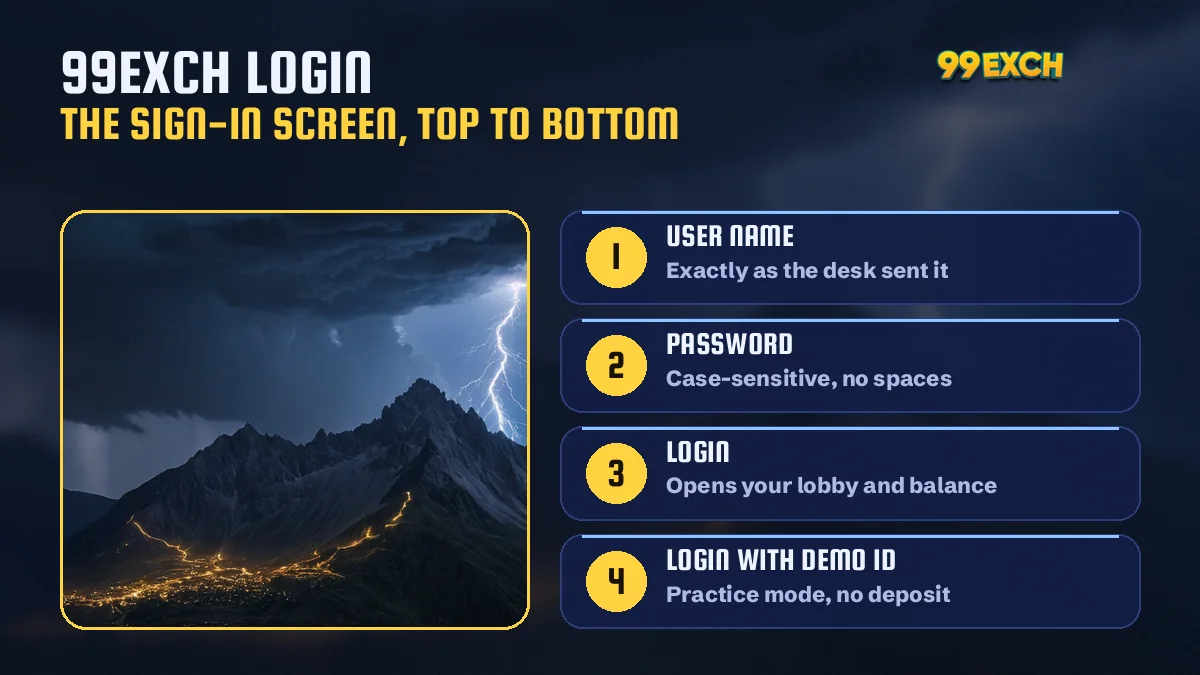
99Exch card set The sign-in screen, top to bottom in four numbered steps: User name, Password, Login, Login with demo id
Past the gate, the storm clears: tabs for INPLAY, CRICKET, FOOTBALL and TENNIS, then match rows with two price columns per outcome.
  • The heading has gone — no LOGIN text, no boxes, and a sports name such as CRICKET highlighted where the form was. That swap is the plainest sign your 99Exch login went through.
  • Two numbers per side — a row such as 1.79 | 1.80 is your proof that the exchange loaded. Left column backs the outcome, right column lays it.
  • A promo sheet on top — 99exch.com laid an APK offer over its lobby the first time we opened it. Dismiss the sheet; the match rows wait beneath.
  • LOGIN again — the pair was probably not accepted. Re-type, do not re-paste.

Pressed Login with Demo ID by mistake and now sitting in practice play? Go back to the sign-in screen, find the LOGIN heading again and use the two boxes this time. In practice the giveaway is your balance: if the 99Exch lobby shows none of the money you deposited, you are almost certainly in the demo, not in your own account.

One balance serves both sports and casino tables on 99Exch, so there is no second login for the casino side; how that balance moves is on how the single 99Exch balance is handled. A real ID with nothing in it can look around but cannot bet, and the smallest top-up the desk accepts is ₹100, with the UPI steps on the 99Exch deposit by UPI page.

Quick check. Lobby visible, tabs live, prices in pairs? Then you are done with this screen and the rest belongs to the markets.

Free 99Exch Login with Demo ID Versus a Real Funded ID

Login with Demo ID sits right under the main Login button, and it is the reason a lot of first-time visitors land on the 99Exch sign-in screen at all. It costs nothing. It needs no deposit. It also carries no real balance, which is exactly the point and occasionally the source of confusion, because someone who pressed it by accident will see a working exchange and wonder why their own money is missing.

PointLogin with Demo IDReal 99Exch ID
Where it startsIts own button on the sign-in screenA User Name and Password from the WhatsApp desk
Money neededNoneA first deposit of ₹100 or more to place bets
What it is forPractice: learning back and lay columns, finding your way round tabsReal bets from one balance shared by sports and casino
WithdrawalsNothing to withdrawSent only to a bank account held under your name
TypingNot the desk pairUser Name and Password, both case-sensitive

Demo is the cheaper teacher. Well, it is free, so cheaper undersells it. A sensible use is to open the demo, watch how a price like 1.79 | 1.80 sits in its two columns, place a practice back and a practice lay, and only then sign in with the real 99Exch pair when the layout no longer feels foreign.

Hours in practice never convert into anything. No button on the 99Exch screen promotes a demo session, so when you are ready the route runs through the chat instead, as set out on the page about getting a 99Exch ID by chat.

The demo is also a decent way to check a phone before you trust it with real bets. If the 99Exch lobby renders properly in practice mode — tabs readable, two price columns side by side — it will render the same way once you sign in with your own ID.

99Exch Login Password and ID Notes in One Trusted Box

Where the 99exch login begins on this screen

The 99exch login begins at the LOGIN heading on 99exch.pro or a spare ending such as .red, .live, .green or .win. Two boxes, User Name then Password, and one Login press. The lobby at 99exch.com has its own Login link in the top row.

How the 99exch id login pair reaches you

Think of a 99exch id login as two errands in a fixed order: chat first, screen second. The pair turns up by WhatsApp or SMS after a New ID request, and only then do the two 99Exch boxes have anything to check.

Typing rules for the 99exch login password
  • Capitals and small letters must match the desk's message.
  • The User Name is case-sensitive as well.
  • No trailing space from a pasted chat line.
  • Old saved passwords from autofill get cleared after a reset.
The demo route beside the 99Exch Login press

On the screen, the demo press is the line right under Login. Pick it and your User Name is never read; you get 99Exch practice markets with no deposit, and your own funds stay out of sight until you come back and use the two boxes.

Addresses where this 99Exch sign-in screen appeared
  • 99exch.pro, 99exch.red, 99exch.live, 99exch.green, 99exch.win in our 11 Oct 2026 check.
  • /m/home and /m/login on .red in the 10 Oct check.
  • Not 99exch.io, which served nothing.
When the 99Exch login refuses a correct-looking pair

Hand-typing beats pasting as a first fix. Past that, the 99Exch desk (24x7 on WhatsApp and Telegram) resets the pair under Password Issue, and our 99Exch com login page lists each refusal case separately.

Which Trusted 99Exch Addresses Showed This Login Screen on 11 Oct 2026

Betting domains get blocked in India from time to time, which is why 99Exch runs more than one ending. The same 99Exch ID and the same balance work on any address that is up, so a blocked .pro is an inconvenience rather than a lost account. We opened each address at roughly 05:40 IST on 11 Oct 2026; treat the table as a dated snapshot, not a promise for next week.

Ending typedSeen at about 05:40 IST, 11 Oct 2026Use it for the pair?
99exch.proThe sign-in screen with all nine itemsYes
99exch.redThe same sign-in screenYes, see the 99Exch red spare ending
99exch.liveThe same sign-in screenYes
99exch.greenThe same sign-in screenYes, see the 99Exch green address
99exch.winThe same sign-in screenYes, see 99Exch win ending sign-in
99exch.comThe full sports lobby, with Rules and Login in the top rowYes, through that Login link
99exchpro.comOpened straight into a sports lobbyLobby first
99exch.ioA 404, no site at allNo, see the 99Exch IO status note

Spot the extra e. We are 99exech.pro, an information site that writes about 99Exch, and neither 99exch.pro (the sign-in screen in row one) nor 99exchpro.com (the lobby further down) belongs to us. Our card above only forwards; it has no way of checking whether your password is right.

A detail from the same morning: the bare https:// request to 99exch.com timed out once at 05:38 and loaded on a retry. So one failed load is not proof of a block. Try again, then try a spare ending. On phones, the /m/home and /m/login paths on .red rendered the same sign-in screen in a 10 Oct check, because the mobile route opens the login first; more on that on the 99Exch phone path /m/home page.

If the ending you normally use stops loading, a sensible order is roughly this: reload once, then open one of the spare endings that showed the sign-in screen, then message the desk for whichever 99Exch address is working that day. Your ID does not care which ending you choose. It is the same 99Exch account on .red as on .live, and the balance follows you rather than the address — that point bears repeating, because people sometimes ask the desk for a new ID when all they needed was a different ending.

No 99Exch ID Yet? The Quick WhatsApp Route Comes First

Empty-handed at the LOGIN heading? Your exit is the eighth item on the 99Exch screen, Contact On Whatsapp, which reaches the same desk saved as +91 81097 11726. Mention you have never had an account, answer its short 18-plus and contact questions, and wait; by the desk's own estimate about a minute later the chat shows a pair plus a link back to this very screen.

Then come back here, to the LOGIN heading, and type the pair. That loop is short. It is also the only way in; the demo door does not lead to a real account no matter how long you play there.

A few things make the first sign-in smoother. Keep the desk's message open on one side while you type on the other, so you are copying from the original rather than from memory. Note which 99Exch ending the desk's login link pointed to, since that is the address it expected you to use that day. And if the chat offered a password you dislike, sign in with it once first, then raise a Password Issue request; asking for a change before you have ever reached the lobby just adds a round trip.

The same desk handles the other three requests on its list — Deposit Issue, Withdrawal and Password Issue — and it answers 24x7 on WhatsApp and on Telegram. For the sign-in screen, though, only two of those matter: New ID before your first visit, Password Issue whenever the pair stops working.

99Exch question board Sign-in questions beside a mountain peak under lightning, opening with: How do I log in to 99Exch?

Quick 99Exch Login Answers Before You Press the Button

How do I finish a quick 99Exch login on the official screen?

Find an ending where the LOGIN heading greets you, then copy the desk's pair into its two boxes and press Login a single time. A correct pair replaces the form with the 99Exch sports exchange. A wrong one returns you to the same heading, which usually means one capital letter slipped.

Why is my real balance missing after the free 99Exch Login with Demo ID press?

Because that press never opened your account. Login with Demo ID on 99Exch runs practice play with no deposit and no real money, so funds you added through the desk are simply not part of it. Return to the LOGIN heading and use the User Name and Password boxes to see them.

Where does a real 99Exch ID come from before my first 99exch id login?

Only the 99Exch WhatsApp desk issues one; the sign-in screen cannot. Tap Contact On Whatsapp, say you need a New ID, give a name plus a contact number and confirm you are 18 or over. Your User Name and Password arrive back in that chat, ready for the two boxes.

Is my 99exch login password case-sensitive on the official screen?

Yes. The 99exch login password and the User Name are both case-sensitive, so every capital and small letter must match the desk's message. Pasting from chat can also add a hidden trailing space. If careful typing still fails, the desk resets the password through its Password Issue route.

Why does the official 99Exch login screen show a reCAPTCHA notice?

The notice says the 99Exch sign-in screen is guarded by reCAPTCHA, a check that filters automated login attempts. In our 11 Oct 2026 check it appeared as a short line under the buttons rather than a puzzle. You type the pair and press Login as usual.

Can one verified 99Exch ID log in on every working address?

It can. Your 99Exch account is tied to the pair, not the ending, so the balance travels with you whenever an address gets blocked in India. On 11 Oct 2026 we found the identical sign-in screen on .pro, .red, .live, .green and .win, and any of them took the same two boxes.

Can I use the 99Exch login fast on a phone?

Yes. On Android you can use the browser or the Download .apk file from the sign-in screen. On iPhone, use the browser and add the page to your home screen. The /m/home and /m/login paths on .red opened the same sign-in screen in a 10 Oct check.